A set of geometric primitive classes are used within nGI to model geometric objects. Most of these objects are usable in the two-dimensional euclidean space, some are usable in the three-dimensional euclidean space. The sketches show these geometric primitives in a coordinate system where the positive y-axis is going down. While the geometric primitives are agnostic of this special configuration, it has been chosen in order to avoid confusion, because the nGI graphics and image coordinate systems are oriented in exactly this way.
Besides being able to calculate interesting things for geometric primitives, arguably one important thing to do with them is to draw them on a graphics surface. Thus, for visible geometric primitives we have implemented graphics support. nGI is capable to draw most geometric primitives. In order to do so you can use widgets that make use of the geometric primitive and draw it outlined and/or filled.
In addition, for most geometric primitives that can be draw, they also can be manipulated interactively by the user. A point and a line can be dragged around, a circle's diameter can be dragged, etc. This provides simple means to manipulate a geometry interactively and use it as an input for a processing function.
direction
A direction is a vector of unit length in two-dimensional space. It
serves the same purpose as an angle, i.e. it represents a direction in
the two-dimensional Euclidean space R2.
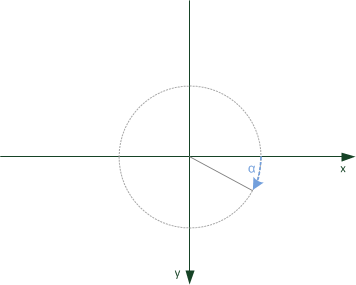
You can default-construct a direction (corresponding to an angle of 0 degrees)
// default construct a direction
direction dir;
or you can pass an angle:
// construct a direction corresponding to 30 degrees
direction thirty(radians(30));
The angle you pass is in radians (you can use the radians function to
convert degrees to radians).
Here is how to calculate the opposite direction.
// point to opposite direction
auto opposite = thirty.get_opposite();
This is not the same as negating the numeric value of the angle.
// point to negative angle (-30 degrees)
auto minus_thirty = - thirty;
Adding a scalar or another direction to a direction changes its angle.
// change the angle
auto sixty = thirty + radians(30.);
auto also_sixty = thirty + thirty;
Normalizing a direction brings it into the range between 0 and 2π (0 to 360 degrees).
// normalize a direction
auto also_thirty = direction(radians(3630.)).get_normalized();
With a given direction, you can calculate a normal direction, which is perpendicular to the direction (rotated by 90 degrees in the positive direction).
// normal of a direction
auto ninety = dir.get_normal();
You can also calculate a direction’s angle or you can read back its ordinate and abscissa.
// read back angle, abscissa and ordinate
auto angle = thirty.get_alpha();
auto abscissa = thirty.get_abscissa();
auto ordinate = thirty.get_ordinate();
vector
A vector is a vector of arbitrary length in two-dimensional Euclidean
space R2.

You can default-construct a vector (of length 0 at the origin) or you can pass a coordinate pair or you can pass a length and a direction. With a given vector, you can calculate its direction and length. You can also read back its horizontal and vertical extents. You can also add two vectors or you can multiply a vector with a scalar.
point
A point is a point at an arbitrary position in two-dimensional
Euclidean space R2.

You can default-construct a point (at the origin) or you can pass a coordinate pair. You can translate a point by adding a vector. You can also read back it’s horizontal and vertical position. The difference of two points is the directed distance between them, i.e. it is a vector.
line
A line is a line at an arbitrary position and direction in
two-dimensional Euclidean space R2 that extends into
infinity at both ends.
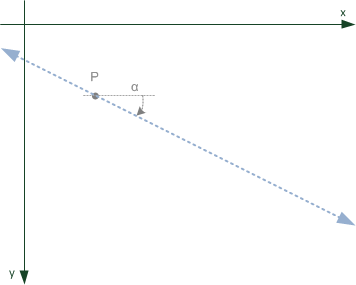
You can default-construct a line (horizontal at the origin) or you can pass a point and a direction. There are various ways you can modify a line, which boil down to the fact that you can modify its origin and direction.
ray
A ray is a line starting at an arbitrary position and extending into
infinity along its direction in two-dimensional Euclidean space
R2.
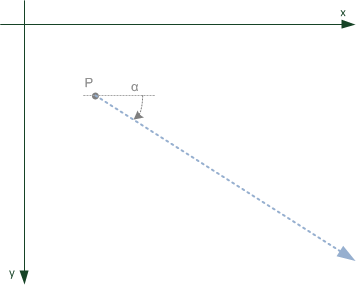
You can default-construct a line (horizontal starting at origin along the positive x-axis) or you can pass a point and a direction. There are various ways you can modify a ray, which boil down to the fact that you can modify its origin and direction.
line_segment
A line_segment is a line between two arbitrary points in
two-dimensional space R2.
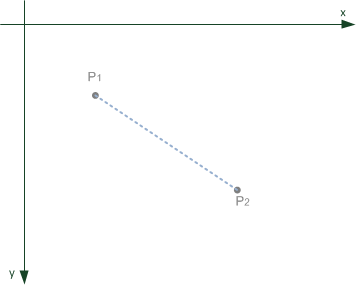
You can default-construct a line_segment (between origin and point [1, 0]) or you can pass a point, direction and extent, or you can pass two points. There are various ways you can modify a line_segment, which boil down to the fact that you can modify its origin, direction and extent.
box
A box is a rectangle of arbitrary size located at an arbitrary point
in two-dimensional Euclidean space R2, whose sides are
parallel to the coordinate axes.

You can default-construct a box or you can pass a point and a vector.
circle
A circle is located at its center point P and contains the set of
points having distance radius to the center point.

You can default-construct a circle or you can pass a point and a radius. A circle is characterized by a center point P and the radius r.
rectangle
A rectangle is characterized by a center point P, two radii
rx and ry and an angle α.

A rectangle can be created from a center point, a diagonal vector and an angle given in radians.
ellipse
An ellipse is characterized by a center point P, two radii
rx and ry and an angle α.
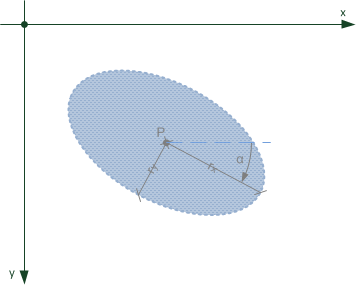
An ellipse can be created from a center point, a diagonal vector and an angle given in radians.