A region is a subset of the discrete two-dimensional space. It represents a set (in the sense of mathematical set theory) of discrete coordinates. A region may be finite or infinite. A region may not be connected and it may contain holes.

Regions are an essential concept in computer vision and are useful in many respects.
Regions are not necessarily related to images; they can exist independently and without images. In addition, the coordinate space is not confined to the bounds of an image, and regions can extend into the quadrants with negative coordinates in the two-dimensional space.
Regions can be built in various ways:
Build Regions by Segmentation
Image segmentation can lead to a foreground and/or background region.
region foreground = region::segment(img.get_view(),
    [] (image_type::value_type const& v) {
        return v < 150; });
A region built by segmentation - as any other region - does not need be connected in general case.
Build Regions from Geometry
Regions can be built from basic geometric shapes like rectangles, circles, ellipses or polygons:
region roi = region::from_circle(circle<>(point<>(300, 300), 200));
Basic Usage of Regions
Basic usages of regions are for various purposes:
- Regions can constrain image processing to an image subset only.
- Regions can be used to calculate features (this is also called particle analysis or blob analysis). Examples of such features are the area or the center of gravity. Region features are described in detail in the chapter about particle analysis.
Once regions have been created by either image segmentation or any other method, they can be manipulated in many ways:
Move Regions
Regions can be moved in the plane (translation).
region moved_roi = roi.translate(vector<>(300, 0));
Split Regions into Connected Components
Regions can be split into connected components:
region_list objects = region_list::connection(foreground);
The connection method takes an optional second distance parameter. If the distance between two region pixels is smaller than this distance, the pixels are considered to be connected, otherwise, the pixels are not considered connected. This allows you to group near objects into the same region, while still splitting objects that are far away.
If the distance parameter is not given, it defaults to 1, which in turn means that 8-connectivity is used. If the distance parameter is 0, this means that 4-connectivity is used. If higher size values are given, gaps between objects smaller than this size are not separating objects, i.e. you can group narrow objects easily. If necessary, different distance values can be specified for the horizontal and vertical directions to allow anisotropic behavior.
Manipulate Regions With Set Operations
Complex regions can be built by combining two or more of them with set operations (union, intersection, difference):
region combined = objects.set_union();

Manipulate Regions With Morphological Operations
Morphological operations can be applied on regions (erosion, dilation, opening, closing):
region_list closed = objects.closing(region::create_circular_region(5));
Use Regions as Structuring Elements
Regions can be used as structuring elements for morphological operations. Regions that are used as structuring elements must be centered on the origin. There is a set of member functions in the region class that allows to create these structuring elements easily (create_rectangular_region, create_circular_region, create_elliptical_region).
Convert Regions to Polygons
Regions can be converted to polygon lists, or to point lists that consist of the vertices of the polygon list. The polygon lists or point lists can be used for visualization and also for further processing, such as the calculation of the convex hull polygon.
Regions are implemented with run-length coding. Compared to alternative implementations as binary images, run-length coded regions have several advantages:
Efficient storage space usage (run-length regions have a medium storage space requirement of ($O(\sqrt a)$), where (a) is the area of the region, whereas a binary representation would have a storage space requirement of (O(wh)), where (w) and (h) are the width and height of the enclosing box, which is typically worse than ($O(\sqrt a)$).
Corresponding thoughts are valid for run-time complexity of most algorithms (run length regions typically have a run-time complexity of ($O(\sqrt a)$), whereas a binary representation would have a run-time complexity of (O(wh)).
In addition to the storage-and time saving run-length coding, regions are also stored in a sorted way. Most ways of creating regions make it natural to express the internal sorting, without any additional time overhead related to the sorting. This additionally affects region based algorithm run-time performance positively, since many algorithms on sorted regions can perform very efficiently and lead to short run-time. Regions consist of one or more lines that are sorted by their vertical row coordinates. Each line in a region consists of one or more chords that are sorted by their horizontal column start coordinate. See the figure and table table for an example of a simple region with one hole.
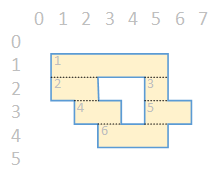
| Chord | Row | Column | Length |
|---|---|---|---|
| 1 | 1 | 1 | 5 |
| 2 | 2 | 1 | 2 |
| 3 | 2 | 5 | 1 |
| 4 | 3 | 2 | 2 |
| 5 | 3 | 5 | 2 |
| 6 | 4 | 3 | 3 |